
Help And Support
OCBC Velocity - Login
-
How do I log in to OCBC Velocity for the first time?
For user with OCBC OneToken (digital token)
Before you log in to OCBC Velocity for the first time, ensure you have the following ready:
- Welcome Email for a new user (containing instructions to set password and activate your digital token)
- Mobile device installed with the OCBC Malaysia Business Mobile Banking app (downloaded from the Apple Store or Google Store)
- Launch the app. When prompted, please allow notifications and access permission to the app.
- Tap on the 'Set your password (for new users)' hyperlink below the login box.
- Follow the instructions shown on-screen to activate OCBC OneToken (digital token) and set your password.
- Please wait for the cooling period indicated on screen before you can start using the app.
- You will receive a notification indicating your OCBC OneToken has been activated after the cooling period.
For user with hardware security token or password mailer issued
If you have opted to use the hardware token, the nominated contact persons(s) for your company will receive an OCBC Velocity starter kit, within 12 business days, at the mailing address that you have registered with us. You will need to collect the hardware token from him/ her, before you proceed to log in.
- Go to OCBC Velocity login page https://velocity.ocbc.com.
- Key in your Organisation ID, User ID and Password (as indicated in the password mailer) at the login box.
- Click 'Login' and follow the on-screen instructions to activate your token and set a password.
-
Why am I not receiving any notifications on my mobile phone for login?
In order for you to receive push notifications to your mobile device that will allow you to seamlessly log in onto OCBC Velocity, please ensure that notifications and the required permissions are enabled for OCBC Malaysia Business Mobile Banking app in your mobile device settings.
Alternatively, you can still generate the One-Time Password (OTP) manually for login.
- Click on the OneToken menu from the business mobile app.
- Tap on the option 'For account login'
- Use OCBC OneTouch/ OneLook (if previously synced) OR enter the 6-digit OneToken PIN that you have created when activating OCBC OneToken. Click 'Submit'.
- A 6-digit login OTP will be shown on the mobile screen.
- Return to your web browser, key-in the OTP generated from the business mobile app onto the web screen. Click 'Submit' to proceed with login.
-
How do I reset my password or unlock my OCBC Velocity account?
A. If you have activated your security token/ OCBC OneToken and registered your mobile number with us:
- Click on the ‘Forgot Password/Unlock User’ hyperlink (below the ‘Password’ field) on the login page.
- Enter your Organisation ID and User ID, check on the checkbox for Agreement and click ‘Submit’.
- Follow the on-screen instructions to set a new password or to unlock your ID immediately.
B. If you have NOT activated your new token:
- Complete the Manage OCBC Velocity Account Form.
- Submit the original form, signed by the authorised persons, at any of our OCBC branches nationwide.
Upon receipt and verification of the form, we will process your request within 12 business days. The password mailer will be sent to your mailing address as maintained in our records.
Once you have successfully logged in with the new password mailer, you may want to update your contact details in OCBC Velocity via Tools > Change Contact Details; this is so that you can instantly reset your password or unlock your account online.
-
Why am I getting the ‘Invalid User ID/Password’ error message?
If this is your first time logging in upon receipt of the password mailer, please ensure you have keyed in the correct password provided by the Bank. Note that the password is case sensitive. Common mistakes include misreading the following:
- The letter “b” for the number “6”.
- The letter “O” for the number “0”.
- The letter “I” for the number “1”.
- The letter “I” for “J” when placed side-by-side.
- The letter “D” for the number “0”.
-
What are the system requirements to access to OCBC Velocity?
Please ensure that you have the appropriate software requirements and operating system/ browser combinations.
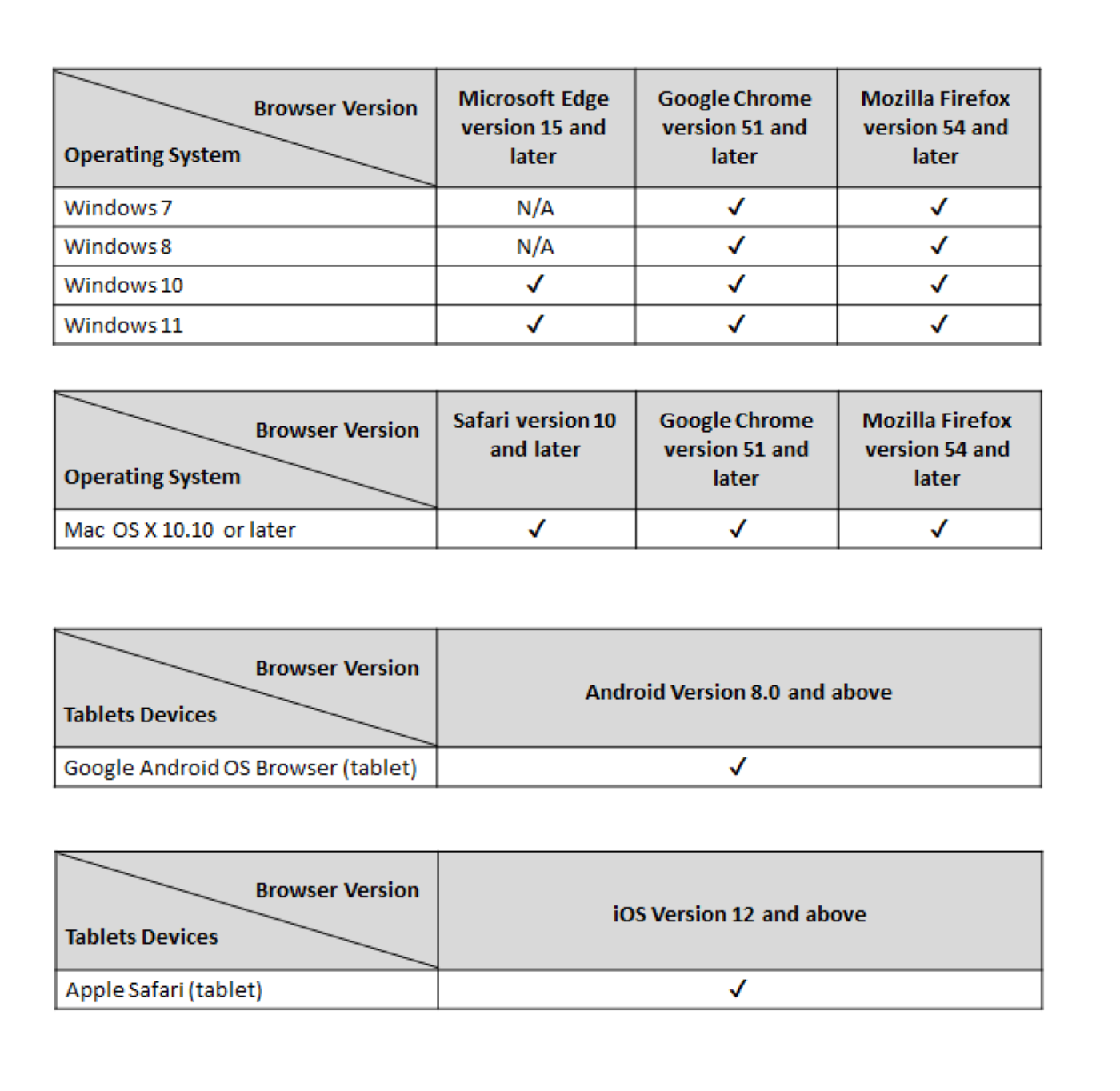
Please ensure that TLS (Transport Layer Security) v1.2 is enabled in your web browser security settings in order to access OCBC Velocity.
-
How do I log out of OCBC Velocity safely?
Simply click on “LOGOUT” on the top right-hand corner of your screen.
For your protection, OCBC Velocity will automatically log you out if there is no activity for 14 minutes. Your session will also be terminated automatically if you have been logged in for 120 minutes.